I often meet companies that want to start with Inbound Marketing and Marketing Automation, but are unsure how. What should be done and in what order?
That's why I'm going to write down a step-by-step guide for exactly what you need to do to get started.
More...
The guide is based on my own experience with over 30 companies in my role as marketing manager at a small Swedish company, my previous life as a Hubspot consultant, and now with the team at FunnelBud, where we help companies implement our CRM. The focus is on B2B, but the guide can also work for B2C with a few modifications. The goal is to deliver results in the form of leads, meetings, and deals as quickly and easily as possible.
So read on if you want a complete guide to getting started with Inbound Marketing and Marketing Automation!
The components: What is included in your complete Marketing Automation implementation?
I will begin by listing all the individual components that should be in place when we are finished. Then I will make a step-by-step checklist of what you need to do and in what order.
Let's start with the components, below:
You have optimized contact forms or buttons that lead to contact pages on the website.
Surprisingly, there are still many companies I encounter that do not have any contact forms. This is the lowest hanging fruit, so start with this! If you already have contact forms, consider whether you can place them in more or more easily accessible locations.
Here are standard recommendations that we "know" work well based on best practices and our own experiences:
- Directly on the home page, without forcing the visitor to scroll
- On the About Us page
- At the end of key pages
Also, follow Conversionista's tips on how to make your contact forms easy to fill out ('s system helps you with many of their tips).
Once you have optimized your contact forms, you can be sure that you won't miss out on the hottest leads when you increase the number of visits.
You have a "Subscribe" form on your website.
It may seem strange, especially if you don't have a newsletter yet, but create a subscription form right away anyway! Place it on various pages, such as all your blog posts (on the right-hand side and at the bottom), and in the middle of longer and more popular pages (e.g., on the home page and in long blog posts).
The subscription form captures visitors who are curious and interested in passively staying in touch. Make sure you don't miss out on these people.
You have a basic conversion (e.g., white paper or trial request) with subsequent drip on the website.
The purpose of this conversion point is to capture people who are somewhat more actively interested in solving their problem, but are not yet ready to make contact.
Create a guide orwhite paper that helps customers better understand the problem and how you solve it. This helps the customer while also increasing your credibility. If you have a software product, a trial version can be an alternative or a complement.
Place your white paper (or trial request) on a landing page behind a form. Offer value in exchange for their email address. Then place clear calls to action (links in the form of clear buttons or images) on different parts of your website to drive visitors to the landing page.
When someone downloads your white paper (or signs up for a trial), they receive a thank-you email with the content. They can then receive a drip (a series of follow-up emails) with additional relevant and inspiring content and links. When your contacts click on the emails, you can see that they are interested and can get in touch with them personally.
You have a regularly updated blog and social media accounts with content that appeals to your target audience.
A blog is an excellent, perhaps the best, way to attract new traffic. And it still works.
What doesn't work is spamming with uninteresting and ill-conceived blog posts just to get as much out of it as possible. What works and will likely continue to work for the foreseeable future are articles that address issues your customers are interested in.
Each blog post provides you with potential new external links, new keywords that are visible on Google, and strengthened internal SEO due to internal links.
Each new blog post also gives you the opportunity to publish a post with a link on social media. This will give you a temporary boost in traffic, where some people will like, share, subscribe, and even go on to read more about your product and then request contact.
You have a regular newsletter that keeps your existing contacts happy
Many companies have hundreds or thousands of contacts that they never get in touch with. These may be contacts from previous meetings that are lying around in the CRM system, or people who downloaded some material that was never followed up on.
Many of these are potential buyers. In a previous job where I was responsible for marketing, we collected new leads over a period of three years, but if we didn't manage to sell to them, they just sat there cluttering up the system. One day, we decided to call them all. It turned out that many had bought competing solutions, and we realized that we had lost many big deals because we hadn't kept in touch.
That's why it's important to both maintain old contacts (stay top-of-mind) and recognize when a contact shows interest. A newsletter system with lead scoring mechanisms can help you do this.
Not sure what to write in your newsletter? Reuse content from your blog! Add a short introduction at the top with a message from the CEO, and then link different sections to your latest blog posts. The latter part can be fully automated, as a good newsletter tool can automatically retrieve your latest blog posts and accompanying images from your website.
You have AdWords and social media ads with associated custom landing pages that generate new leads.
Many companies spend money on ads whose clicks lead to their website. This is a huge waste!
Instead, send each click to its own customized landing page that:
- Talking about the same thing as the ad
- Has a clear call to action (e.g., download a white paper about what the ad is about)
- Optimized for conversion
If you have several ads targeting different keywords and segments, you should have several landing pages: one for each ad. This will dramatically increase the number of leads.
It is often difficult to create standalone, specially designed campaign pages such as landing pages. FunnelBud's landing page feature makes it super easy! You simply drag and drop modules and then change the content. This allows you to create as many landing pages as you want, one for each ad.
If we estimate a click cost of $3 and a fairly low click-to-lead conversion rate of 4%, an advertising budget of $300 per month would give you 100 clicks and 4 leads per month. How many new deals would you get in a year if you received 4 leads every month who downloaded a white paper about your solution?
(Please note that the cost per click can vary greatly depending on the type of solution you are selling. In the example above, I am using an advertisement for an enterprise product with a long sales cycle. If you sell more transactionally, you can get a much lower cost per click and many more clicks.)
The image below shows how one of our customers has already recouped 10x their investment in closed deals using this method, and has a pipeline with an expected deal value of 30x their investment:
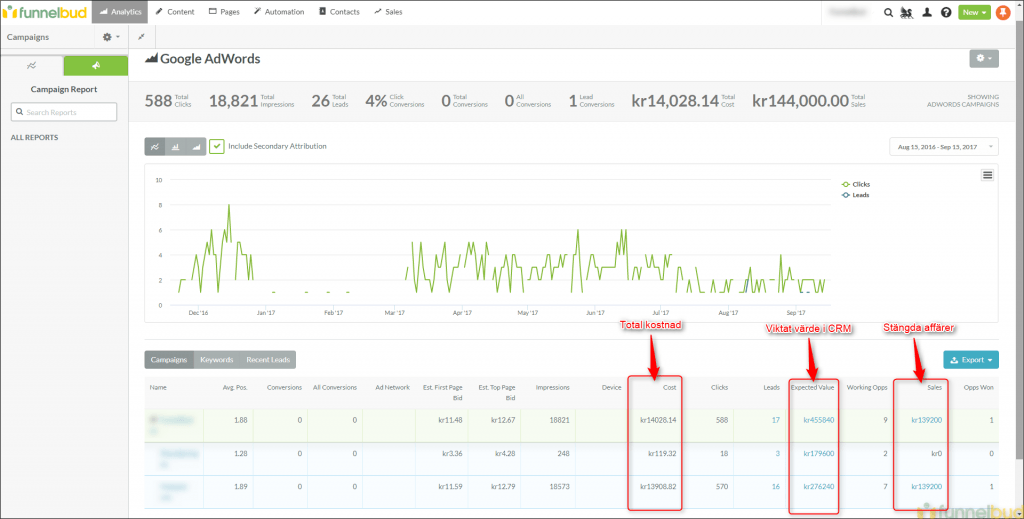
The image shows a customer who spent $1,400 on AdWords and has already closed deals worth $14,000 (10x the money). Their expected deal value is over $45,500!
You have Facebook Lead Ads, which give you new leads straight from Facebook.
Facebook Lead Ads means you can capture leads from Facebook without even having to leave the platform. Your leads go straight into FunnelBud and are followed up on.
It's a whole new way of capturing new leads that makes the experience smoother for both you and your lead. Instead of having to click, leave Facebook, and fill in their contact details on a new page, their details are already pre-filled in Facebook and they just press OK.
This is a complement to the method above for generating even more leads.
You "extend" your physical customer meetings with specially tailored follow-up drips.
One of the biggest problems salespeople have is that it often feels tedious to follow up and see how things are going after you've met. How can you get around this?
By providing value!
You can do this by having ready-made, inspiring feeds that are specially tailored to different types of customers. During the meeting, ask, "Is it OK if I add you to our newsletter and send you some material that I think might be of interest?" If the contact is interested, you will usually get a yes.
Then add them to one of your ready-made drip campaigns with inspiring and useful content. Some emails may be about how other customers in their situation solved the same problem. Others link to various blog posts and material on your website that answer frequently asked questions.
You can make this drip as long as you want, as long as you have enough interesting material. If you want to be more advanced, you can adjust the frequency so that if someone doesn't click, the waiting time until the next email increases. And when someone clicks, you get a notification and can check if it's time to resume contact.
Now we have listed all the components. In the next step, we will look at exactly what you need to do, and in what order.
Your checklist: How to get started with Inbound Marketing and Marketing Automation
When creating this list, I assume we are starting from scratch. However, if you have already completed any of the steps below, you can skip them.
With that said, here are the steps I recommend to get started with Inbound Marketing and Marketing Automation in the fastest and easiest way:
1. Start with basic fixes on the homepage
Add contact forms and subscription forms to the website. This is the lowest hanging fruit and can be done in just a day or so.
Consider all the pages where you could have a contact form. Add subscription letters to all longer and popular blog posts. If possible, add a "subscribe" form to the right-hand column of all blog posts and at the bottom.
Also consider placing a large button labeled "Contact us" in the right-hand column on all pages (including the first thing you see on the home page) and linking it to your contact page where you have a contact form.
Feel free to use forms from a marketing automation system such as FunnelBud for this purpose, so that you can collect all the history of where they came from and what they did on your website right from the start, and prepare for the next steps further down the line.
With this done, you won't miss out on potentially lucrative business opportunities, and we can move on to the next step.
2. Import all contacts from any other systems
Why have multiple systems when you can have all your marketing and sales in one tool?
We help you create lists and fields that segment and make it easy to distinguish, for example, customers from non-customers, contacts who have shown interest in different product groups, and other types of segments.
You can now shut down your old systems and hopefully save some money and avoid having different data in different systems. In addition, we have laid the foundation for your future newsletters, and you can start using FunnelBud CRM to manage all your contacts and business opportunities in one place.
If you'd rather keep your old CRM, we'll set up a sync so that hot leads go into your CRM automatically and stay updated in both systems.
3. Create your basic conversion (white paper or guide) and send it out in your first newsletter!
Create a white paper or guide according to the recommendations above. Keep it simple at first, just to get it done! You can improve it later when you see that people are actually starting to download it.
Then send out a newsletter to all contacts in the system and tell them about your new guide! If you haven't sent out newsletters before, you can start with an introduction explaining why they are receiving the letter and how they can unsubscribe. This is a great way to clean up your list. However, you can then follow up manually with those who click and read the guide. Ask "What did you think of the guide?" and resume the dialogue in this way.
Now you have cleared your list and made sure that you don't miss any old business opportunities that have been left in the system since before.
4. Create an ad and link to a landing page
Select a target group or a specific keyword. Then create a landing page tailored specifically to them. Include a clear call to action on the page, such as downloading a white paper that explains how you can solve their particular problem.
Then launch an AdWords ad and set a budget of SEK 2,000/month to measure the results.
If it works well, you can connect to LinkedIn and Facebook. And then increase the budget.
Now you have your first lead generator. This will generate new leads (and perhaps even deals?) for you, and collect data while you continue working on the next steps.
5. Create your first two drip automations (one for white papers and one for sales meetings)
You now receive leads on a regular basis, and it can be beneficial to maintain them. You may also be considering how you can utilize your new system to ensure that new contacts from sales meetings you have attended are not forgotten.
That's why we're now creating our first drip automations: one for automatic white paper downloads, and one where you manually add contacts after sales meetings.
Start by sending a few simple emails that follow up with tips on other material that may be of interest to your contacts. If you don't have enough material yourself, it's perfectly OK to link to external sources, as long as they are relevant and reinforce your point. The aim is to keep in touch in a helpful and friendly way, add value, and be top-of-mind.
Now you can ensure that incoming leads are actually followed up on, maximizing the impact of your sales meetings. At the same time, you can see what the leads are doing and which ones are worth (re)contacting.
BONUS: Connect Facebook Lead Ads to boost the number of leads
Now that you have a good lead follow-up system in place, it wouldn't hurt to boost the number of leads you get. We connect to Facebook Lead Ads, which can give you a good boost at a low cost.
You can reuse the same materials and drips you built in the previous steps.
BONUS: Create retargeting ads
Now you receive leads regularly, you use the CRM tool, and you have up-to-date information about your contacts in the system. Why not use the information you collect about your contacts to also keep in touch on other channels?
Start by creating new lists that contain different types of contacts:
- Contacts with business opportunities
- Contacts who are existing customers
- Divide the above lists further based on what they have read on the website and which product they own.
Then create several different ads on Facebook—one ad for each individual list. For example, customers who own product A but not B, and business opportunities that have shown interest in different products.
Now connect your lists to your Facebook ads so that each contact sees ads tailored specifically to them!
Now you have a new way to stay top-of-mind in a relevant way outside of email. When a contact clicks on an ad and returns, you receive an email and can resume the dialogue.
6. Start blogging, posting on social media, and sending out newsletters regularly!
Now you have all the basic components in place, and it's time to start "doing marketing" in earnest.
Start writing good content. Publish it on your blog. Link to each new blog post on various social media platforms. Ask your employees to share it. And send out a monthly newsletter summarizing your latest blog posts.
Establish clear internal processes for how often you will blog (ideally once every two weeks, but once or twice a week is best). Also establish clear processes for how you will share blog posts on social media and how you will send newsletters.
Over time, learn what content is interesting to your target audience. The longer you continue and the better content you write, the greater the effect will be. And with all the basic components from the previous steps now in place, you will maximize the results of your work.
7. Repeat and improve!
Now you have completed one iteration. You have a basic marketing machine that creates buzz, generates leads regularly, and constantly increases in efficiency (through your regular blogging).
Now it's time to go through it all again. Review all the points above and consider which components you can improve and optimize:
- Are there any other white papers or guides you could write?
- Are there other topics you should discuss?
- Can you personalize the content of your newsletters?
- Are the ads delivering ROI? Which ones should you replace and which ones can you improve?
- Can the landing pages that the ads lead to be improved with new calls to action or more and better content?
- Can you update your drips with better material now that you have created many more blog posts and perhaps more white papers to link to?
- Can you make your drips more advanced, for example, lowering the frequency when contacts don't click and increasing it when they do?
- Can you modify the Lead Scoring model so that only leads that are of interest end up in your CRM?
The end result: What your finished Inbound and Marketing Automation machine looks like
With the checklist above, I have tried to create a step-by-step guide that explains how to get started with Inbound Marketing in the easiest way possible using a Marketing Automation system.
Your final result should now look something like this:
- You have many clear conversion points on your website (white paper, newsletter, contact form).
- You have many entry points from several different media (blog, social media, ads) that bring in new visitors and lead them to conversion points.
- You have an inspiring newsletter that ensures you are top-of-mind and detects when a contact shows interest.
- You have follow-up sequences that continue to inspire both new leads and after customer meetings.
- All your contacts and all information about your contacts are gathered in one place, you have clear segments with contacts in different lists, and you can measure the results.
- Your customer care feels more professional, valuable, and inspiring.
- You have peace of mind because you know that your routines and automations ensure that no deals are missed or forgotten.
I hope this guide has been helpful!
Would you like to try out one of the drip campaigns I mentioned above? Below you can see a fun example of what such a drip campaign might look like!